LG ThinQ
- 4.3
- Rating
- 100.00M
- Installs
- Free
- Price

 Analysis by App-foxy
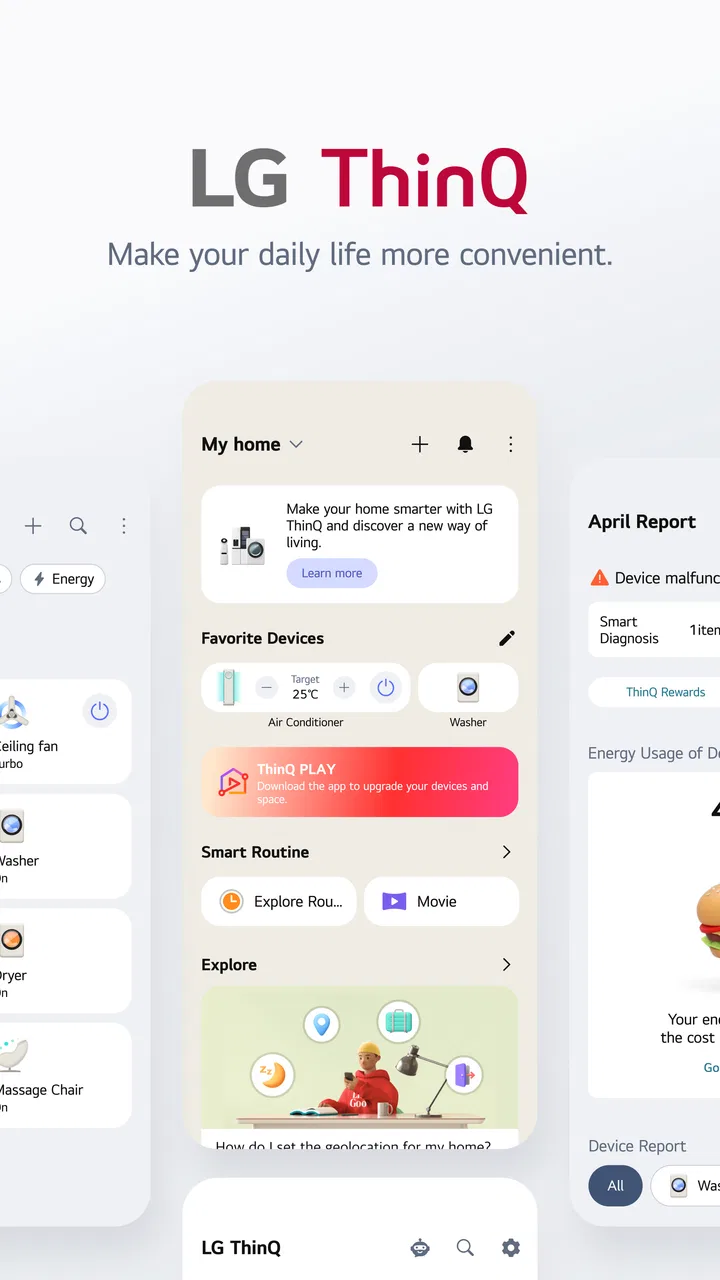
Managing connected appliances sounds simple until a normal evening turns into a chain of small checks: Is the washing machine finished? Did the air conditioner stay on? Is the refrigerator behaving normally? LG ThinQ is designed for that exact kind of household uncertainty. It brings compatible LG appliances and devices into one mobile control point, so I can check their status, adjust available settings, and receive information without walking from room to room.
After spending time with it, I see the app less as a dramatic smart-home transformation and more as a practical remote-control layer for an LG household. Its value depends heavily on the appliances you own, how well they connect, and whether you prefer managing everything from one manufacturer. When that combination is right, it can remove several annoying trips from a daily routine. When it is not, the app can feel like an extra account and another setup process for benefits you may rarely use.
From an ordinary household problem to a connected routine
The starting condition matters. LG ThinQ is a lifestyle app from LG Electronics, Inc., and it works best when your home already includes compatible LG products. It is free, aimed at Everyone, and supports devices running Android 9 or later. That makes the entry barrier fairly low, but “free” does not mean the app replaces the hardware needed to make it useful. Its strongest functions naturally appear only after compatible appliances have been added.
You May Also Like

 Blood Strike: 2.5 Anniversary
Blood Strike’s Loadouts Turn Every Drop Into a Tactical Gamble
A close look at Blood Strike’s custom loadouts: how fast access to signature weapons reshapes its battle royale rhythm, rewards preparation, and narrows the gap between fights.

 Pandora - Music & Podcasts
Pandora’s Music Is Easy to Start, but Harder to Recover
Pandora’s strength is its low-effort path from a seed to a station. Its weak spot is how much confidence it asks you to place in connection, setup, and quiet recovery.

 8 Ball Pool
8 Ball Pool Is Built on Rivalries, Rematches, and Routine
A close look at the rivalries, rematches, shared routines, and unanswered safety questions that turn a quick pool match into a persistent mobile community.

 Samsung Music
Samsung Music’s Quiet Strength Is Playing What You Already Own
Its reach comes less from spectacle than from dependable access to a personal library. That simplicity is both the app’s strongest retention engine and its ceiling.

 AccuWeather: Weather Radar
AccuWeather Review: A Quick, Clear Forecast for Everyday Decisions
For everyday plans, the best forecast is the one you can understand quickly. AccuWeather makes rain timing, radar, and local conditions easy to act on, with a few trade-offs.

 Hill Climb Racing
Why Hill Climb Racing Still Turns Crashes Into One More Run
A tiny car, a bumpy hill and one more upgrade: Hill Climb Racing keeps resurfacing because its simple chaos makes every near-miss feel personal.
More From Our News Desk



I would begin by thinking about the problem I actually want to solve. If I only need a timer for one appliance, the controls on the appliance itself may be quicker. If I want to check several LG products while away, coordinate household routines, or avoid repeatedly interrupting my day to inspect a machine, ThinQ becomes more convincing.
A realistic example is laundry. I can load the washing machine before leaving for work, start the appropriate cycle when the appliance and its configuration allow it, and later check whether the process has progressed without returning home just to look at the display. The benefit is not that the app makes laundry exciting. It is that the handoff between “I started a task” and “I need to know whether it is done” becomes easier.
The same thinking applies to climate control. Before heading home, I may want to check the connected air conditioner or adjust an available setting so the room is more comfortable when I arrive. The app is useful here because the phone becomes the place where I make the request, while the appliance remains responsible for carrying it out.
That division of responsibility is important. ThinQ does not turn every LG product into an identical smart device. Each appliance exposes its own controls and status information. A connected washer, television, refrigerator, or air conditioner may offer a very different experience, so I would judge the app by the complete device combination rather than by its interface alone.
Setting up the first device without making the home more complicated
The first step is creating a workable relationship between the phone, the app, and the appliance. I found it helpful to keep the appliance close to its normal operating position and to have its model information available before beginning. This avoids the common mistake of starting setup while moving between rooms, searching for labels, and guessing which product entry is correct.
Once the device is added, I would immediately give it a clear, location-based name. “Bedroom air conditioner” is much more useful than a generic product label when several devices appear in the same account. This small organizational choice becomes increasingly valuable as more appliances are connected, especially for family members who did not perform the original setup.
I also recommend adding devices one at a time. That makes it easier to identify whether a problem belongs to the phone, the home network, the account, or a particular appliance. Adding everything in one long session may seem faster, but it creates a confusing failure point if one product refuses to connect near the end.
ThinQ is not the right choice for someone who expects a universal controller for unrelated brands. Its identity is closely tied to LG hardware. A mixed-brand household may still find it useful for LG products, but it will not necessarily remove the need for separate manufacturer apps. In that situation, a broader smart-home platform may offer a more unified overview, while ThinQ can remain the more detailed tool for LG-specific controls.
Following the workflow from phone command to appliance outcome
After setup, the basic flow is straightforward: open the app, choose a device, inspect what it reports, select an available action, and wait for the appliance to respond. I like that this structure mirrors the physical task. I am not browsing an abstract dashboard; I am checking a particular machine because I want a particular result.
For a washing machine, the useful sequence is usually status first, action second. I can see whether it is still busy before deciding what to do next. That matters when I am planning the rest of the evening, because a machine that is still running creates a different situation from one that has completed its cycle.
For climate equipment, the same method helps avoid unnecessary adjustments. I can check the current state before sending another command instead of repeatedly tapping controls without knowing whether the first request worked. My practical tip is to treat the status screen as part of the control process, not as decoration. It reduces accidental changes and gives me a clearer sense of whether the app and appliance are communicating.
The app can also be useful for less frequent tasks. If I am away from home, checking a connected product may provide reassurance that it is in the expected state. That is particularly handy when I cannot remember whether I switched something off or whether a cycle has already ended. I would still treat remote control as a convenience rather than a substitute for safe appliance habits: before sending a command, I consider what is physically happening in the room.
One non-obvious advantage is the way the app changes the timing of household work. I can separate the moment when I prepare a task from the moment when I check its outcome. Instead of waiting beside a machine, I can move on and return to the app when the status matters. That is a small shift, but it is where connected appliances provide their most believable everyday benefit.
Where the handoffs become important
The first handoff is between the phone and the account. If the wrong account is used, or if another household member is managing the same appliances elsewhere, the experience can become confusing quickly. Before adding several products, I would agree with the people in the home about which account should be the main reference point and how device names should be written.
The second handoff is between the app and the home network. A command made on the phone must reach the appliance through the connected setup. If the appliance appears unavailable, I would not immediately assume the product is broken. I would check whether the phone is signed into the expected account, whether the appliance is powered, and whether the device still appears in the app. Restarting everything at once can hide the real cause, so I prefer checking those links in order.
The third handoff is from the appliance back to the app. A remote command is only useful if I can tell whether it was accepted and what happened afterward. This is why naming devices clearly and checking status after an important action are more than cosmetic habits. They make the result easier to interpret, especially when several appliances are active at the same time.
Sharing the routine with another person is another practical test. A technically capable user may understand the setup immediately, but a family member may only want to know which appliance is running and whether it needs attention. A simple naming system and a limited number of connected devices can make the experience more approachable than filling the dashboard with every possible product.
Compared with using each appliance’s physical controls, ThinQ adds distance and flexibility but also adds a layer of dependence. Physical buttons work when I am standing in front of the machine and do not require me to navigate an app. ThinQ wins when I am elsewhere, need a status check, or want several LG devices represented in one place. The trade-off is that phone control introduces account, connectivity, and interface friction that a local button does not.
What the completed workflow feels like
The result is most satisfying when I can start with a small uncertainty and finish with a clear answer. I check the laundry, confirm its state, and decide whether I need to wait, unload it, or leave it alone. I check the climate system before arriving home and make one deliberate adjustment rather than several guesses. I look at the connected household from a distance and avoid an unnecessary trip.
That outcome explains why the app has attracted a large audience: it has passed one hundred million installs and holds a 4.3 average from roughly one point two million ratings. Those figures suggest broad adoption, but they do not guarantee that every device combination will feel equally polished. In my experience, the usefulness is strongest when the app answers a question I genuinely ask during the week.
LG ThinQ is also free, which makes experimentation easier. I can install it without committing to a subscription price for the app itself. Still, I would not install it simply because I own one LG product. I would first identify whether remote status, device coordination, or off-site control solves a recurring annoyance. If the answer is yes, the free installation makes testing the workflow reasonable.
The current version, 5.1.26410, is another reason to keep the app updated when using it regularly. Updates are especially relevant for connected-device software because the app has to remain compatible with changing phone systems and appliance services. I would not assume that an update alone fixes every connection issue, but staying current is a sensible part of maintaining the handoff between the phone and the home.
For people who are sensitive to privacy or account complexity, the decision deserves more thought. A connected appliance is not as simple as a traditional one because its convenience depends on digital communication. If you prefer devices that work entirely through local controls, the usual physical interface may be a better fit. ThinQ is most appropriate for someone who accepts that extra layer in exchange for remote visibility and control.
Where the flow breaks and how I would handle it
The most common point of friction is the gap between what I want to do and what a particular appliance allows. The app may bring a device into the same household view, but that does not mean every product offers the same remote actions. I would check the controls shown for the specific appliance instead of assuming that a feature available on one LG product will appear on another.
Another weak point is connectivity. If the app cannot reach a device, the workflow stops before the desired outcome. This is especially frustrating when I am away from home, because I cannot easily inspect the appliance directly. My response would be methodical: confirm power, check the device’s displayed connection state, verify the phone account, and only then consider removing and adding the product again.
Notifications and status information can also change the rhythm of use. An alert is helpful when it tells me that a task needs attention, but a notification is not the same as a physical inspection. For example, a completed cycle may still require me to open the appliance, handle the contents, or check the surrounding area. ThinQ can reduce uncertainty, but it cannot complete the physical part of the chore.
The app may also feel excessive for users with a single appliance and no interest in remote access. If I am always at home, prefer manual controls, and rarely need status information, the extra setup may not repay its cost in attention. In that case, the appliance’s built-in controls are simpler, and a universal smart-home system would only add another layer.
On the other hand, people with several LG appliances are more likely to notice the benefit. The app gives them one place to organize those devices instead of treating every product as an isolated object. The strongest use case is not one spectacular command; it is the accumulation of small saved checks across a normal week.
Who should install it, and who should look elsewhere
I would recommend ThinQ to an LG-focused household that wants remote status checks, phone-based control, and a clearer view of connected appliances. It is particularly suitable for people who leave home while machines are working, manage household chores around a busy schedule, or want another family member to understand what is currently running.
I would be more cautious if your home mixes many brands and you want one consistent control language. A broad smart-home app may be better for top-level coordination, while ThinQ remains useful for detailed LG-specific management. I would also skip it if you dislike accounts, depend on local controls, or do not have a recurring reason to interact with appliances from a distance.
My best advice is to begin with the appliance that causes the most repeated uncertainty. Connect that one, name it clearly, and use the app through a complete cycle from setup to outcome. If the remote check genuinely saves time, add another product. If it does not, there is little reason to turn the whole home into a connected project.
LG ThinQ is not magic, and it does not erase the practical limits of a connected appliance. What it does well is connect the beginning of a household task with the information needed to finish it. The app is free, rated for Everyone, and developed by LG Electronics, Inc., but its real value comes from the fit between your routine and your LG devices.
After using it, I see it as a sensible companion rather than an essential installation for every LG owner. When the workflow is stable, I can prepare a task, hand it off to the appliance, check the result, and respond only when necessary. If that chain matches a problem you face every week, ThinQ is worth trying; if you only want appliances that work without an app, the traditional alternative will probably feel better.
FAQs for LG ThinQ
01What is LG ThinQ and what features does it offer?
LG ThinQ is a smart home app designed to control and manage LG smart appliances and devices. It offers features such as remote control access, energy monitoring, and scheduling. You can also receive maintenance alerts and updates. The app aims to enhance convenience by integrating voice assistants like Google Assistant and Amazon Alexa.
02Is LG ThinQ compatible with all LG devices?
LG ThinQ is primarily compatible with LG smart appliances and some older models that support smart functions. However, not all LG devices are supported. It’s essential to check LG’s official website or the device's user manual to confirm compatibility. This ensures you can fully utilize the app’s features with your specific devices.
03How secure is the LG ThinQ app?
Security is a priority for LG ThinQ, employing encryption and secure login protocols to protect user data. However, like any app, it’s crucial to keep the app updated to the latest version to benefit from security patches. Users should also practice good security habits, such as using strong passwords and enabling two-factor authentication if available.
04Does LG ThinQ work with voice assistants?
Yes, LG ThinQ is compatible with popular voice assistants like Google Assistant and Amazon Alexa. This integration allows users to control their LG smart appliances using voice commands, adding an extra layer of convenience. Ensure your devices are set up correctly with the respective voice assistant for seamless operation.
05Can I use LG ThinQ to monitor energy consumption?
Yes, one of LG ThinQ’s features is energy monitoring. It provides insights into the energy consumption of your connected appliances, helping you manage and reduce your energy usage effectively. This feature can be particularly useful for environmentally conscious users looking to optimize their energy efficiency.
Pros
- User-friendly interface for easy navigation.
- Seamless integration with LG smart devices.
- Energy monitoring helps reduce consumption.
- Remote control access from anywhere.
- Regular updates improve app functionality.
Cons
- Limited compatibility with non-LG devices.
- Occasional connectivity issues reported.
- Requires constant internet connection.
- Some features need premium subscription.
- User data privacy concerns need addressing.

LG ThinQ
Gallery